Corpex-eQMS · Quality Management

One quality system, every record signed and traced.

Corpex-eQMS is eQMS software for pharmaceutical quality management: document control, deviations, CAPA, change control, risk, audits, suppliers, training, maintenance, management review and product quality review, running on one workflow engine with electronic signatures and a tamper-evident audit trail.
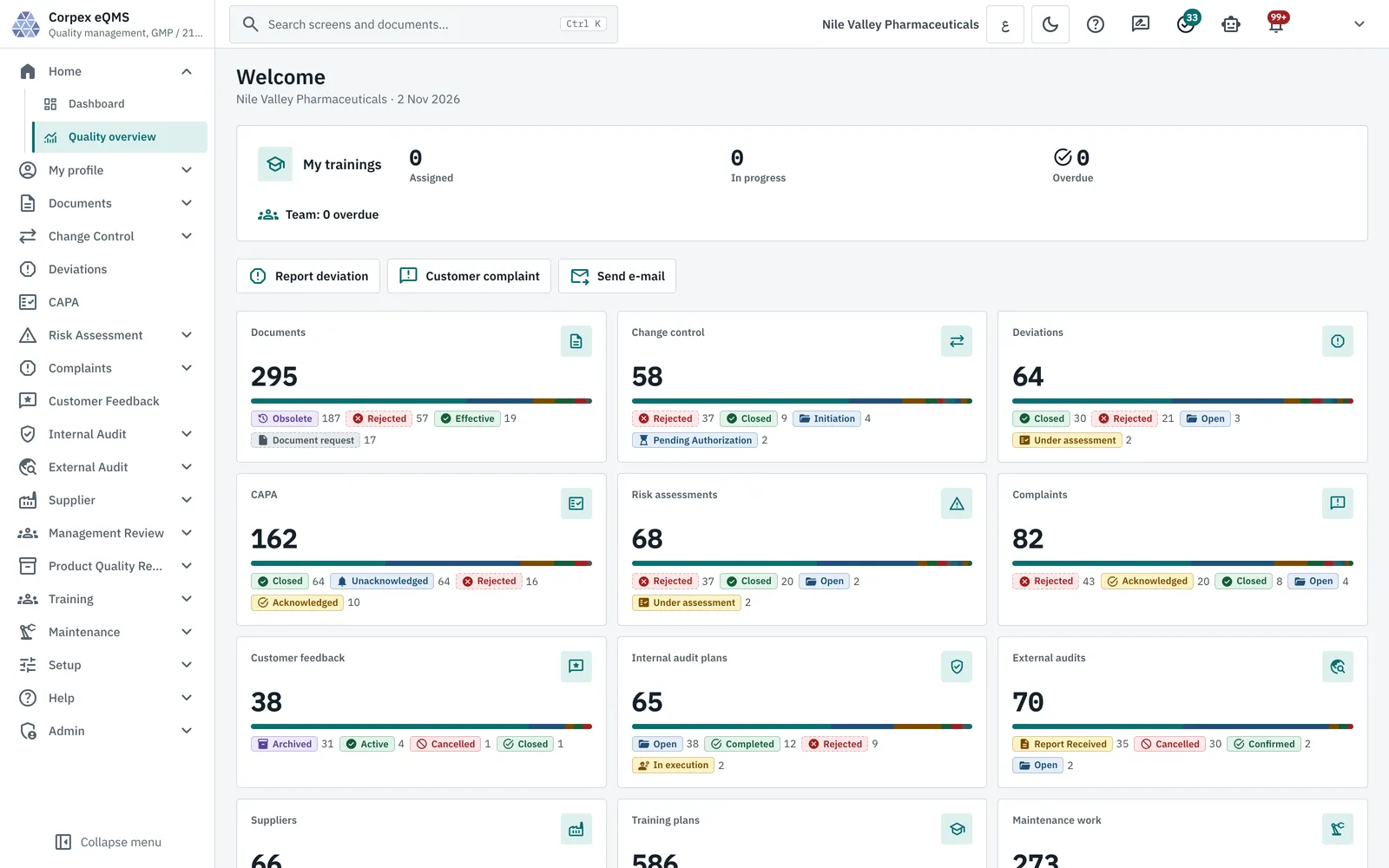
Corpex-eQMS quality overview: live counts of documents, change controls, deviations, CAPA, risk assessments, complaints, feedback and audits by status
  1. Stage 1Open
  2. Stage 2Quality assessment
  3. Stage 3Investigation
  4. Stage 4Review
  5. Stage 5Final approval
  6. Stage 6CAPA execution
  7. Stage 7Closure approval
  8. Stage 8Closed

The standard deviation workflow. Each decision is e-signed, and final approval raises the CAPAs that must be done before closure.

15
ModulesLicensed per site
1
Workflow engineConfigured, not hard-coded
8
Deviation stagesOpen to closed
16
PQR sectionsMapped to EU GMP, 21 CFR, PIC/S
End to End

From a Deviation to a Fix That Held


Each step is a record in its own module, linked to the record that raised it, so an inspector can follow the thread in either direction.

  1. ReportDeviations
  2. InvestigateRoot cause
  3. Correct & preventCAPA
  4. ChangeChange control
  5. Revise SOPDocuments
  6. RetrainTraining
  7. Check effectivenessCAPA
  8. Review trendsManagement review
The Modules

The Quality System, Shown in the Real Application


Pick a module to see its screen. Every screenshot is taken from Corpex-eQMS running on demo data.

01 / 12

Document Control

One controlled register of every SOP, policy and form, with its effective version.
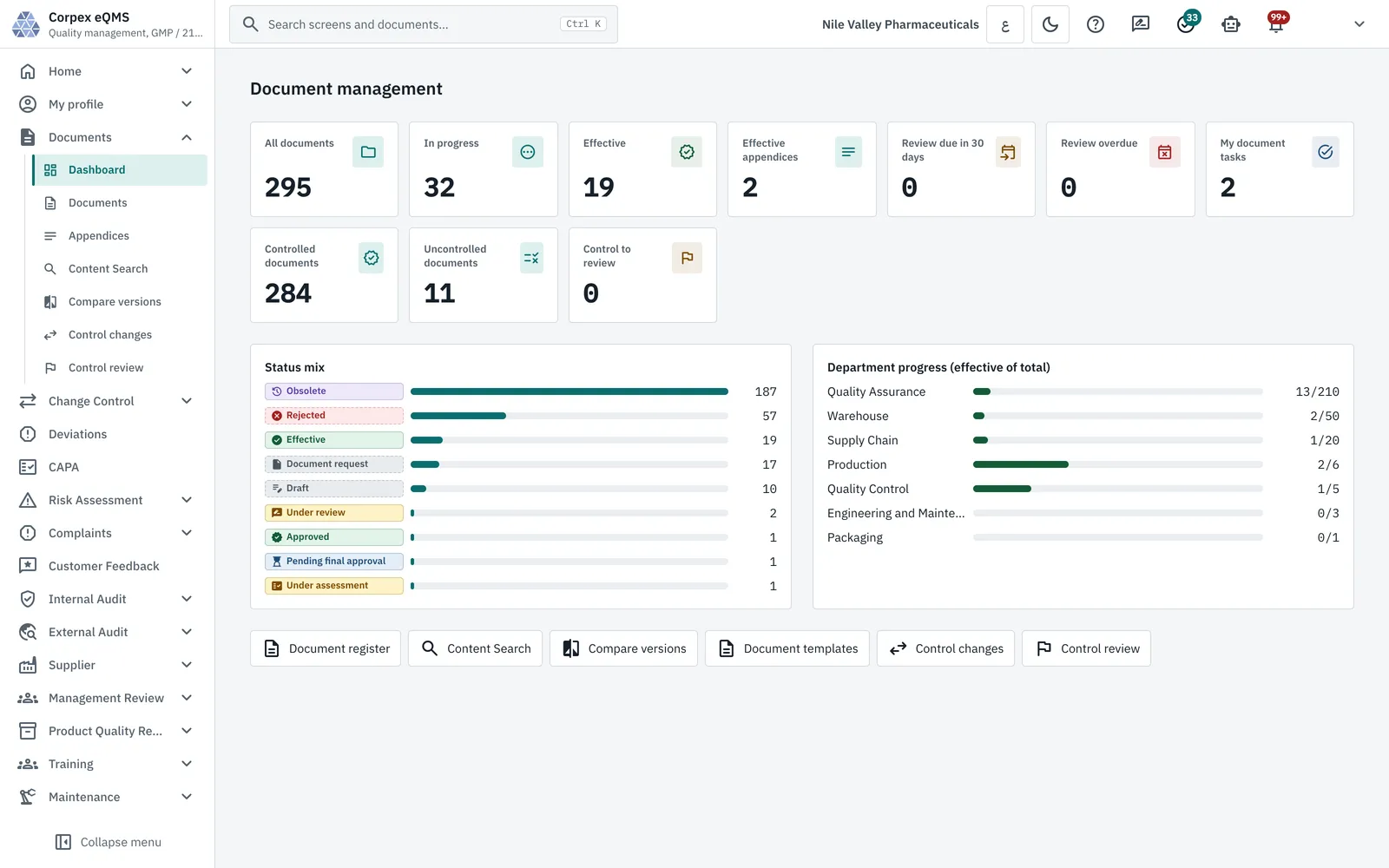
  • Drafting in the browser editor, review and e-signed approval
  • Controlled and uncontrolled copies, issued and withdrawn with a signature
  • Periodic review dates with due and overdue lists
  • Content search, appendices and side-by-side version compare
Explore Document Control Software
Corpex-eQMS document management dashboard with documents by status, controlled copies and department progress
02 / 12

Change Control

Nothing changes on the floor until the right people have assessed and approved it.
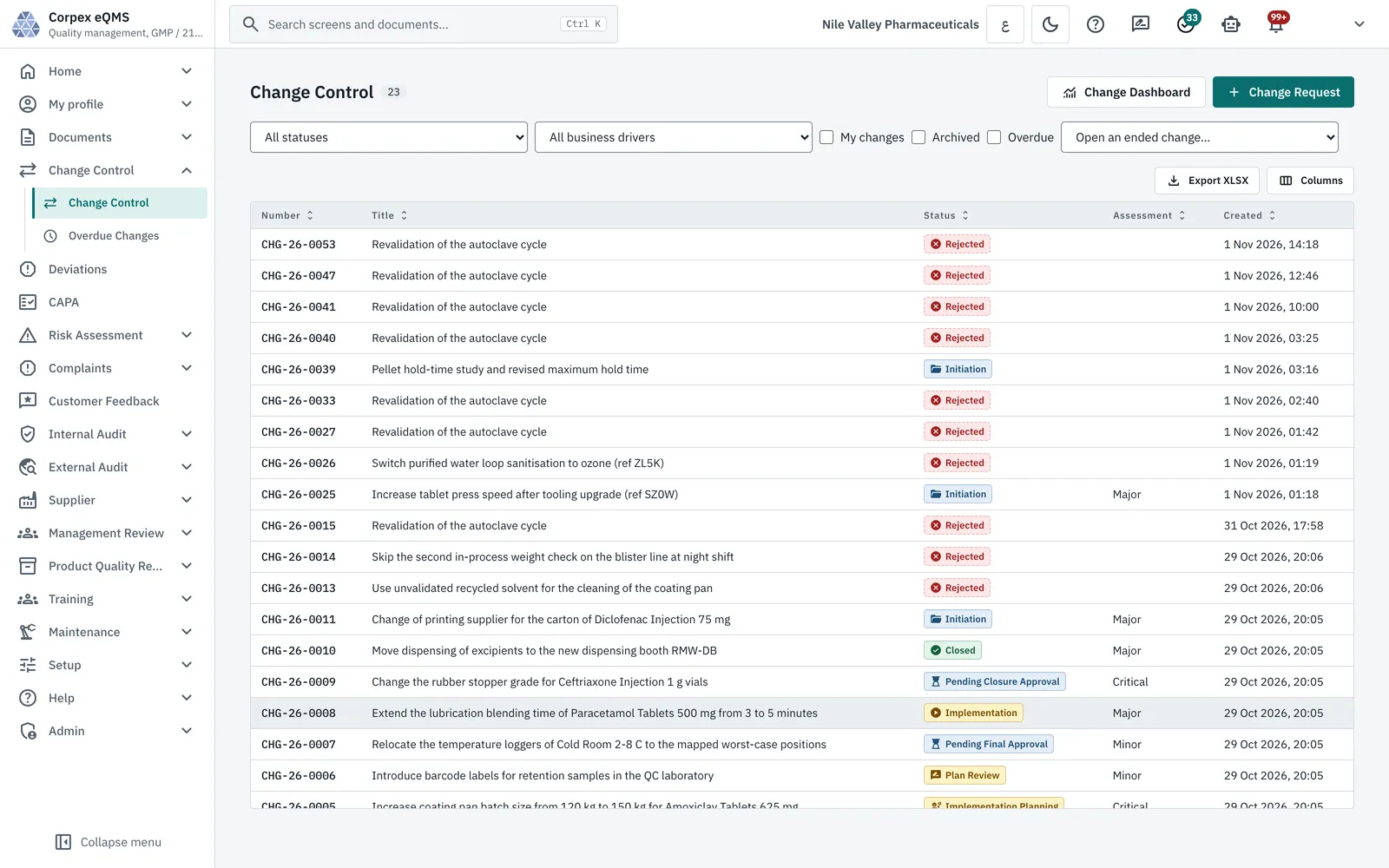
  • Change requests by business driver, from authorization to closure
  • Impact assessment and a linked risk assessment for each change
  • Implementation plan, documentation update and final approval
  • Overdue changes list and a change dashboard
Explore Change Control
Corpex-eQMS change control register with change requests, status, assessment level and creation date
03 / 12

Deviations and Root Cause

Every deviation carries its event, impact, investigation and CAPA on one record.
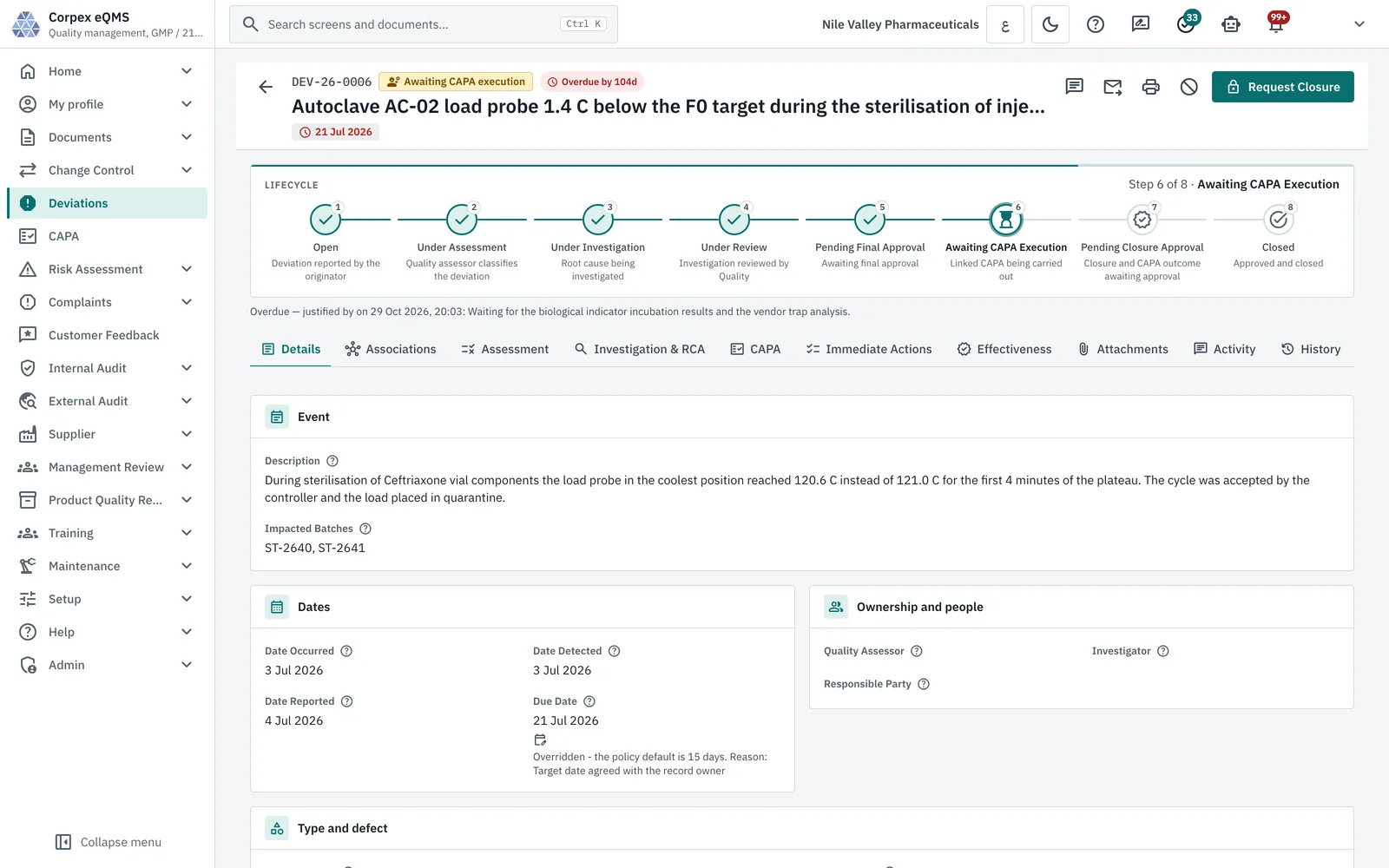
  • Minor, major and critical classification with impacted batches
  • Quality assessment, then an investigation with root cause analysis
  • Immediate actions, linked CAPA and an effectiveness tab
  • Due dates, overdue flags and a written justification when late
Explore Deviation Management Software
Corpex-eQMS deviation record at step 6 of 8, awaiting CAPA execution, with its lifecycle, event and dates
04 / 12

CAPA

One CAPA register, fed by every module that can find a problem.
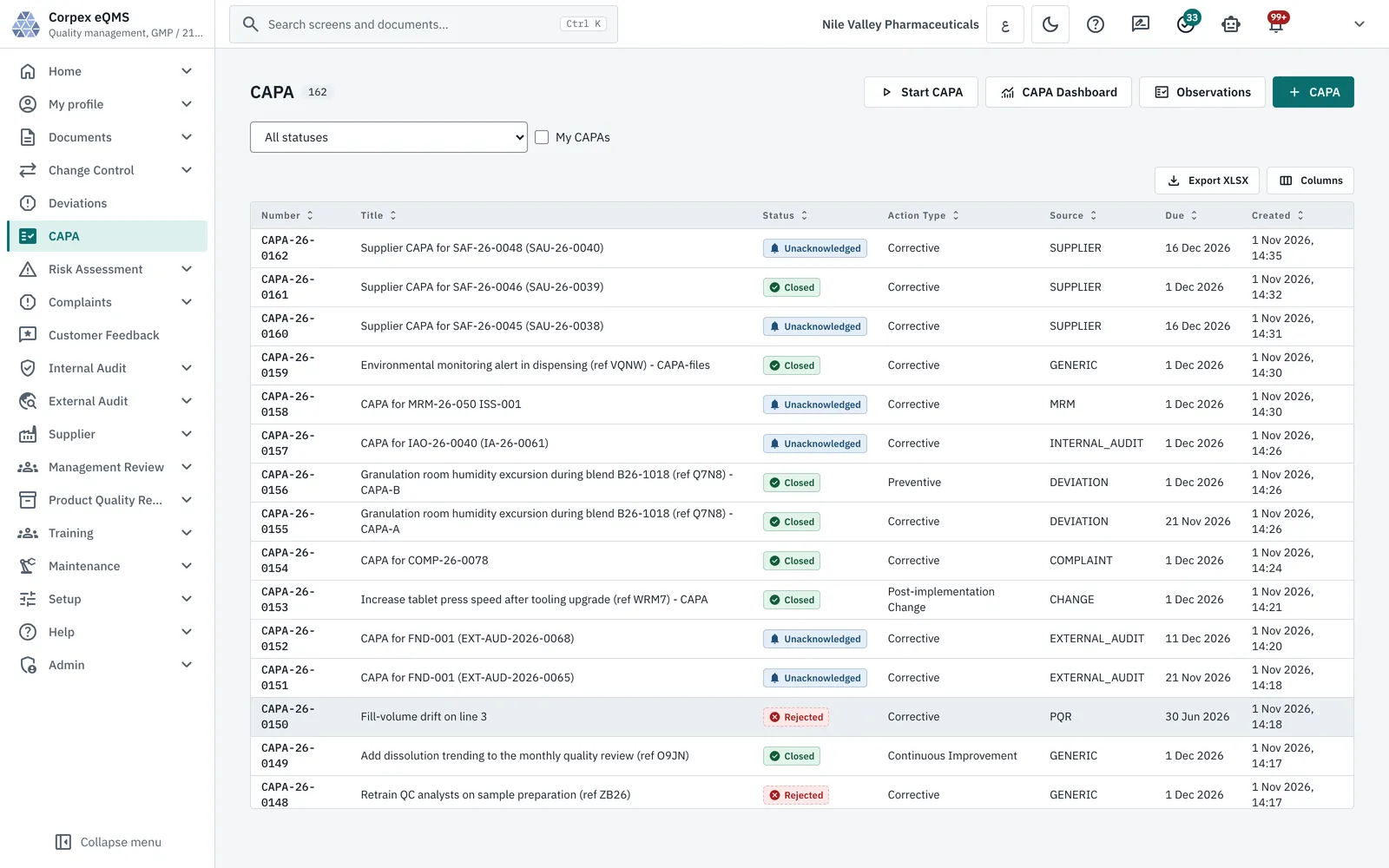
  • Raised from deviations, complaints, audits, suppliers, management review and PQR
  • Corrective and preventive actions with evidence and due dates
  • Effectiveness check recorded as effective or not effective
  • E-signed final approval and closure
Explore CAPA Software
Corpex-eQMS CAPA register showing action type and source module for each CAPA
05 / 12

Risk Management

Quality risk management in ICH Q9(R1) terms, used by the other modules.
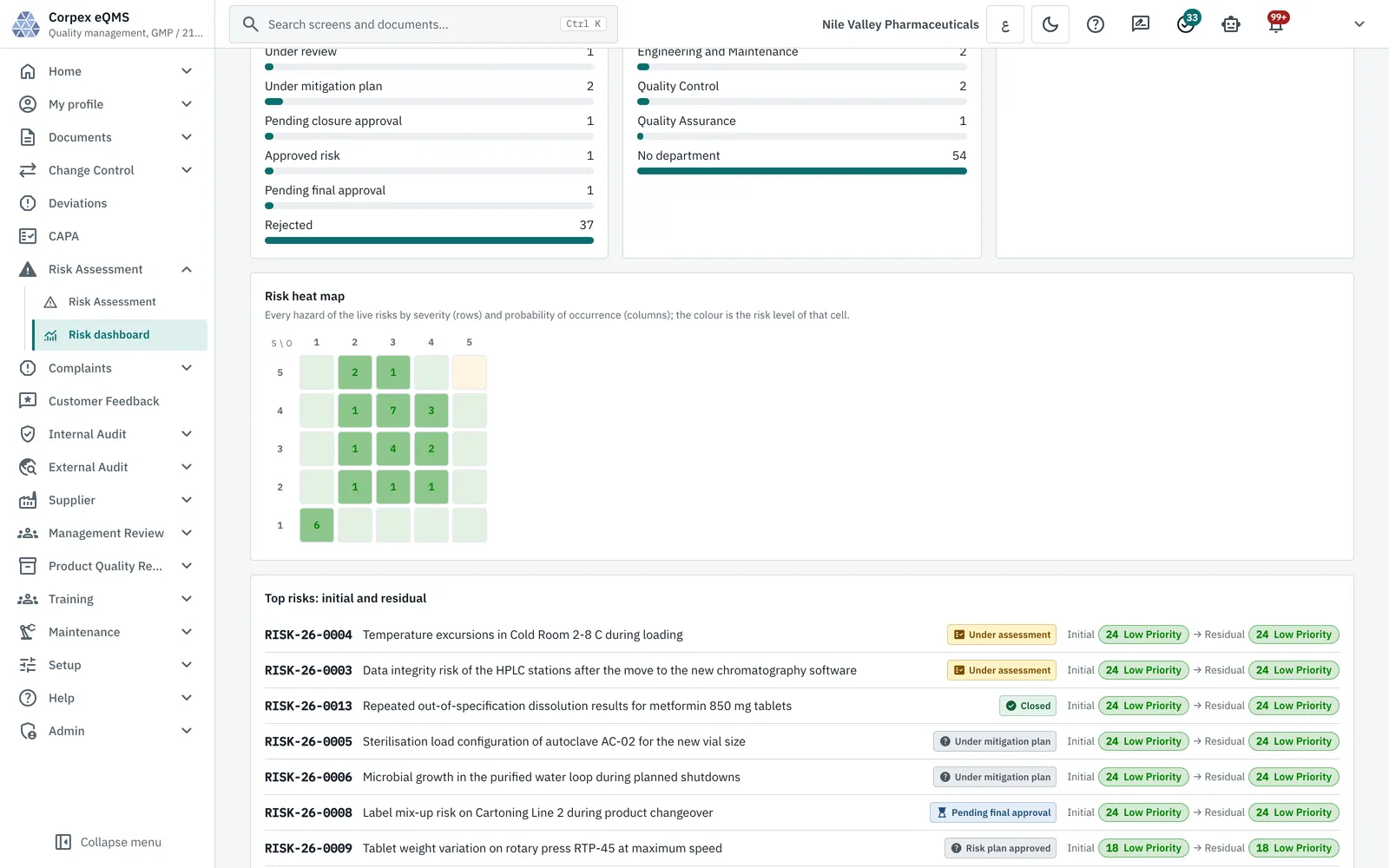
  • Hazards scored by severity, probability of occurrence and detection
  • Initial and residual risk, with residual risk acceptance
  • Risk assessments requested from changes, deviations, complaints and suppliers
  • Heat map, top risks and overdue risk reduction actions
Explore Risk Management
Corpex-eQMS risk dashboard with a severity by probability heat map and top risks with initial and residual levels
06 / 12

Complaints and Customer Feedback

Close the loop with the customer, and measure how they see you.
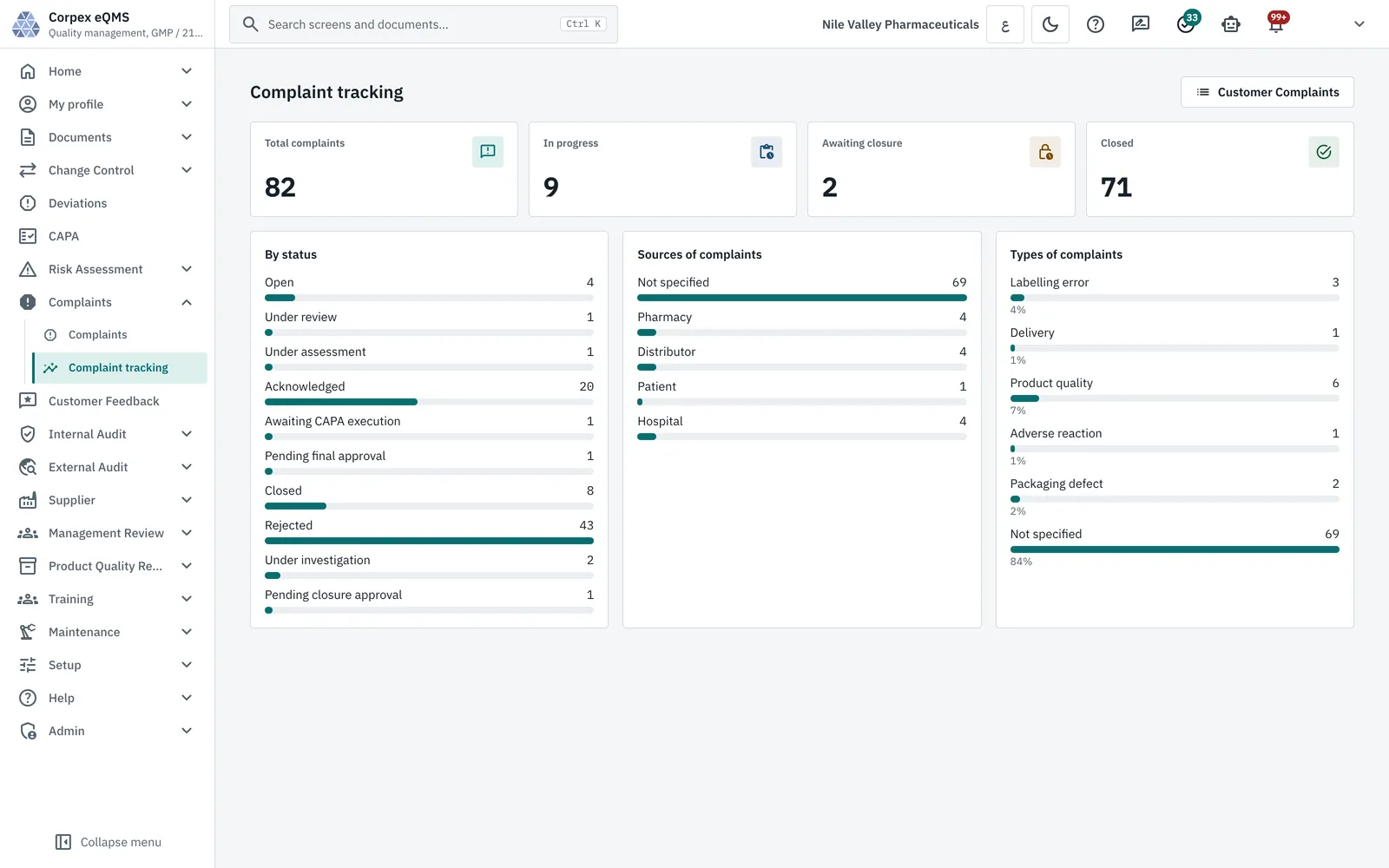
  • Complaint register with investigation and CAPA
  • Tracking by status, source and complaint type
  • Customer feedback forms sent by invitation link
  • Response rate, average score and NPS by question
Explore Complaints Management
Corpex-eQMS complaint tracking with complaints by status, source and type
07 / 12

Internal and External Audits

Plan the audit programme, run the audits and follow every finding to its CAPA.
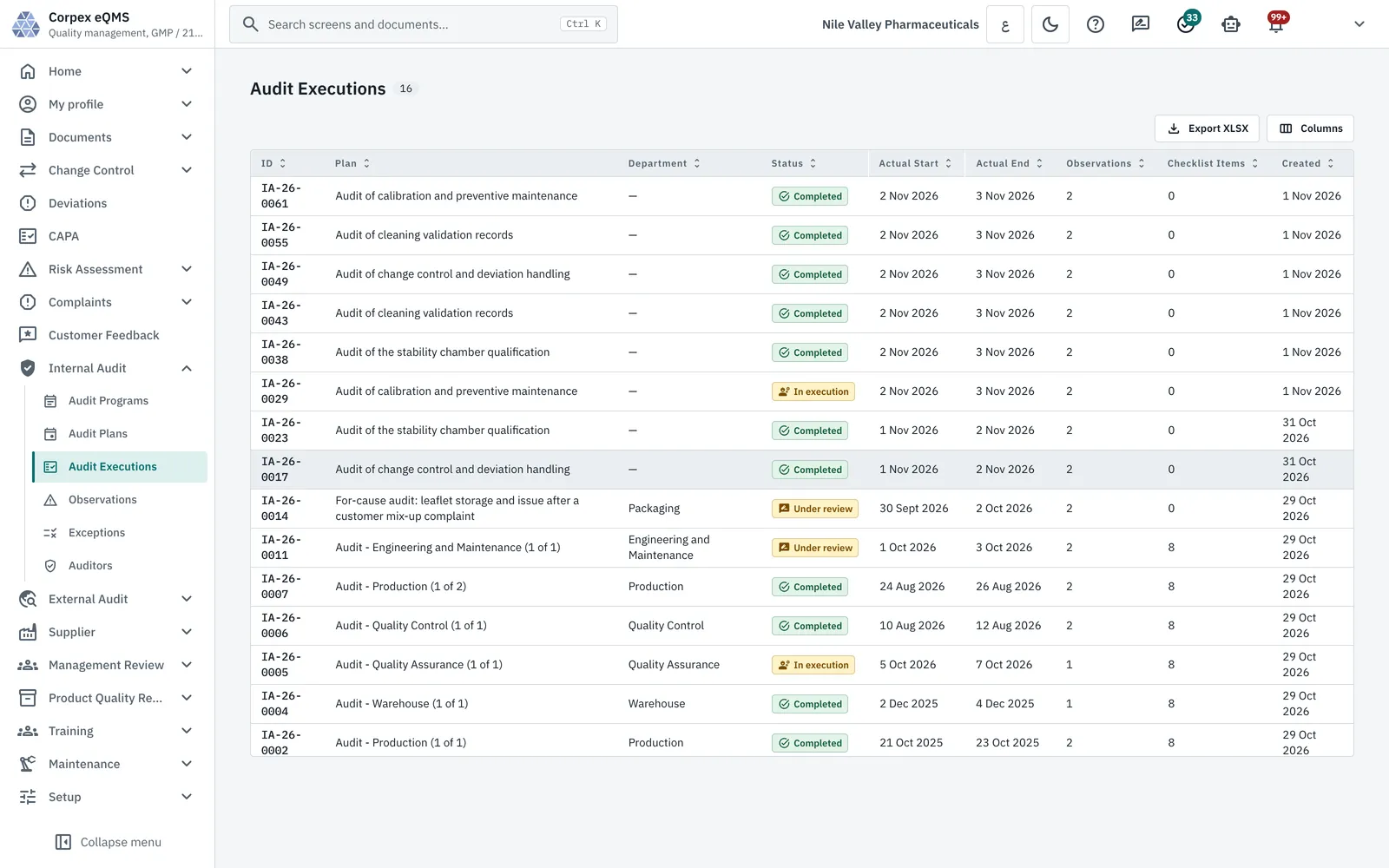
  • Internal audit programmes, plans, executions and checklists
  • Observations, exceptions and a qualified auditor list
  • External and regulatory audits with document requests
  • Findings with CAPA replies and overdue tracking
Explore Audit Management
Corpex-eQMS audit executions with plan, department, status, dates and observation counts
08 / 12

Supplier Management

Know which suppliers are approved, and when each was last audited.
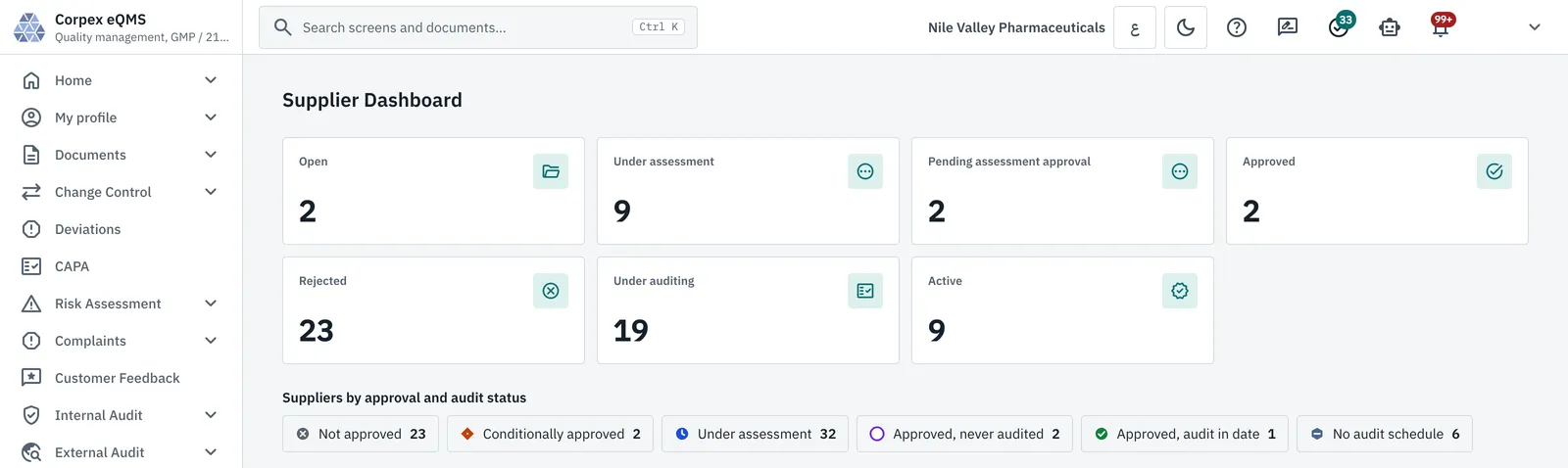
  • Supplier register by approval and audit status
  • Initial, periodic, for-cause and re-assessment audits
  • Findings and the supplier's responses
  • Evaluations with qualification status and next due date
Explore Supplier Management
Corpex-eQMS supplier dashboard with suppliers by assessment, auditing and approval status
09 / 12

Training Management

Staff are trained on the version of the procedure they work to.
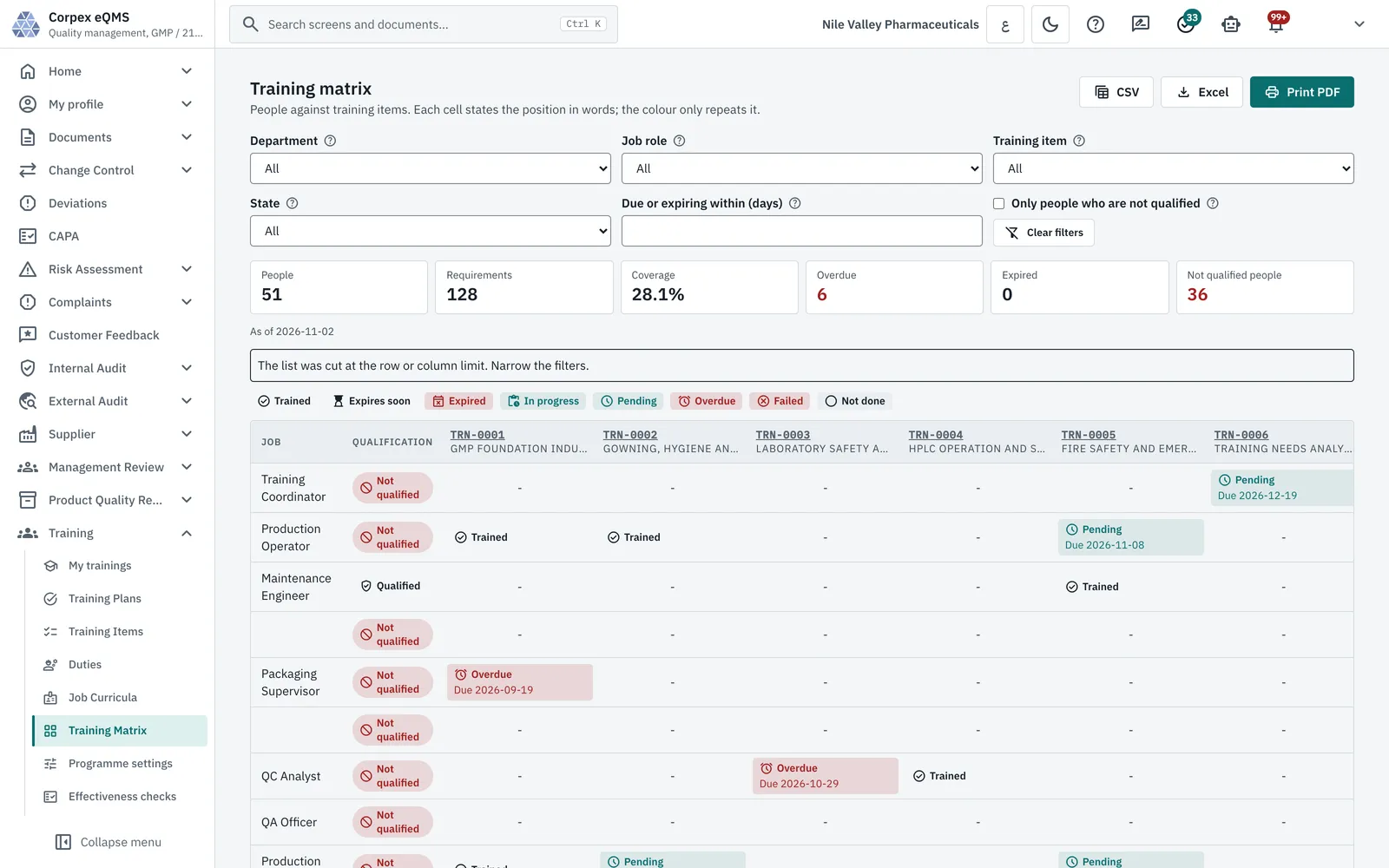
  • Job curricula and duties that assign training items
  • A new document version raises read-and-acknowledge or exam retraining
  • Training matrix by job role and item, exportable to Excel and PDF
  • Effectiveness checks and trainer records
Explore Training Management
Corpex-eQMS training matrix with coverage, overdue and not-qualified counts by job role and training item
10 / 12

Maintenance and Calibration

Equipment stays calibrated and maintained before it touches product.
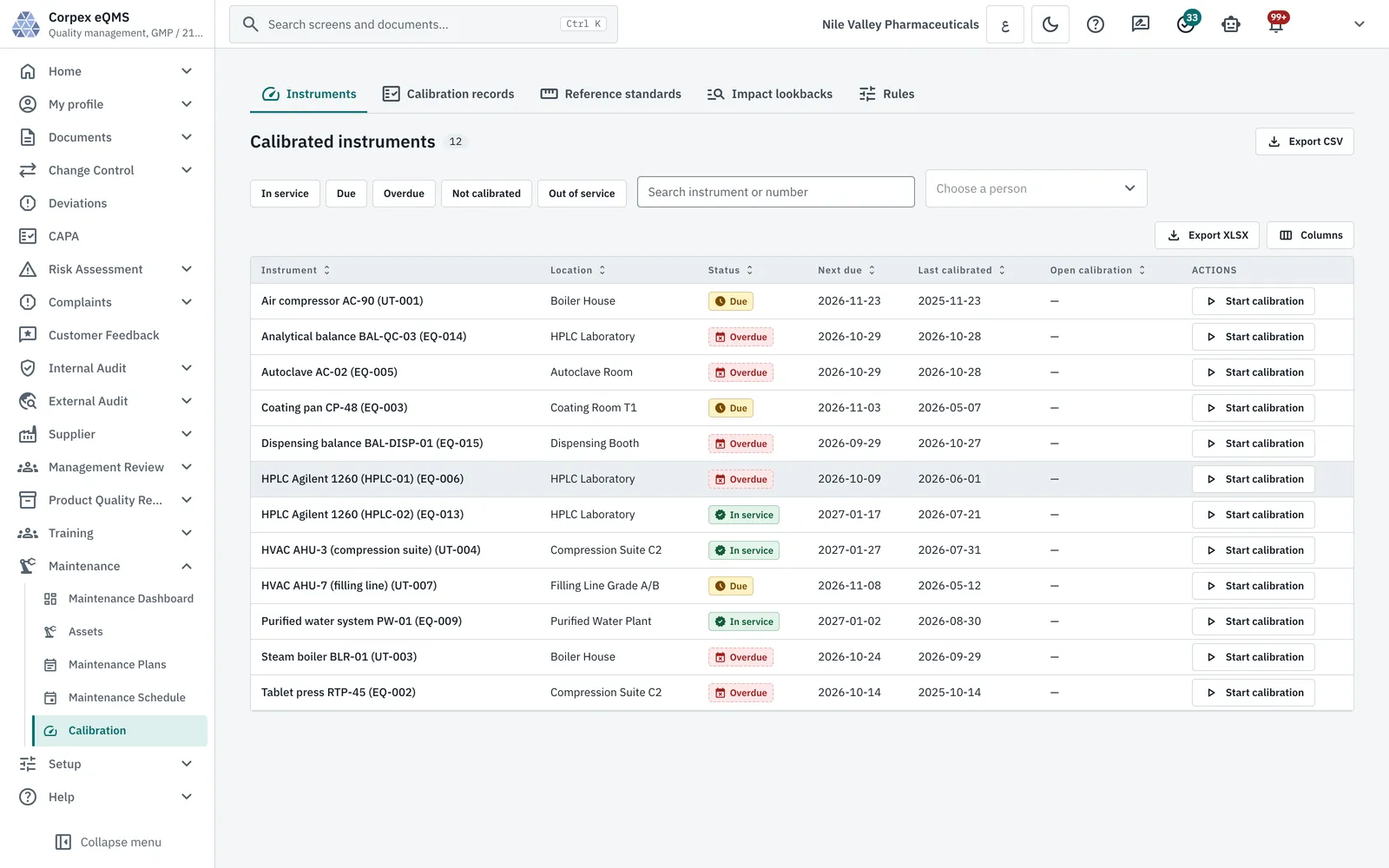
  • Asset register with maintenance plans and a schedule
  • Work orders from request to approval
  • Calibrated instruments with next due date and status
  • Calibration records against reference standards
Corpex-eQMS calibrated instruments with location, due and overdue status, next due and last calibrated dates
11 / 12

Management Review and KPIs

Leadership reviews the quality system on figures the system computes itself.
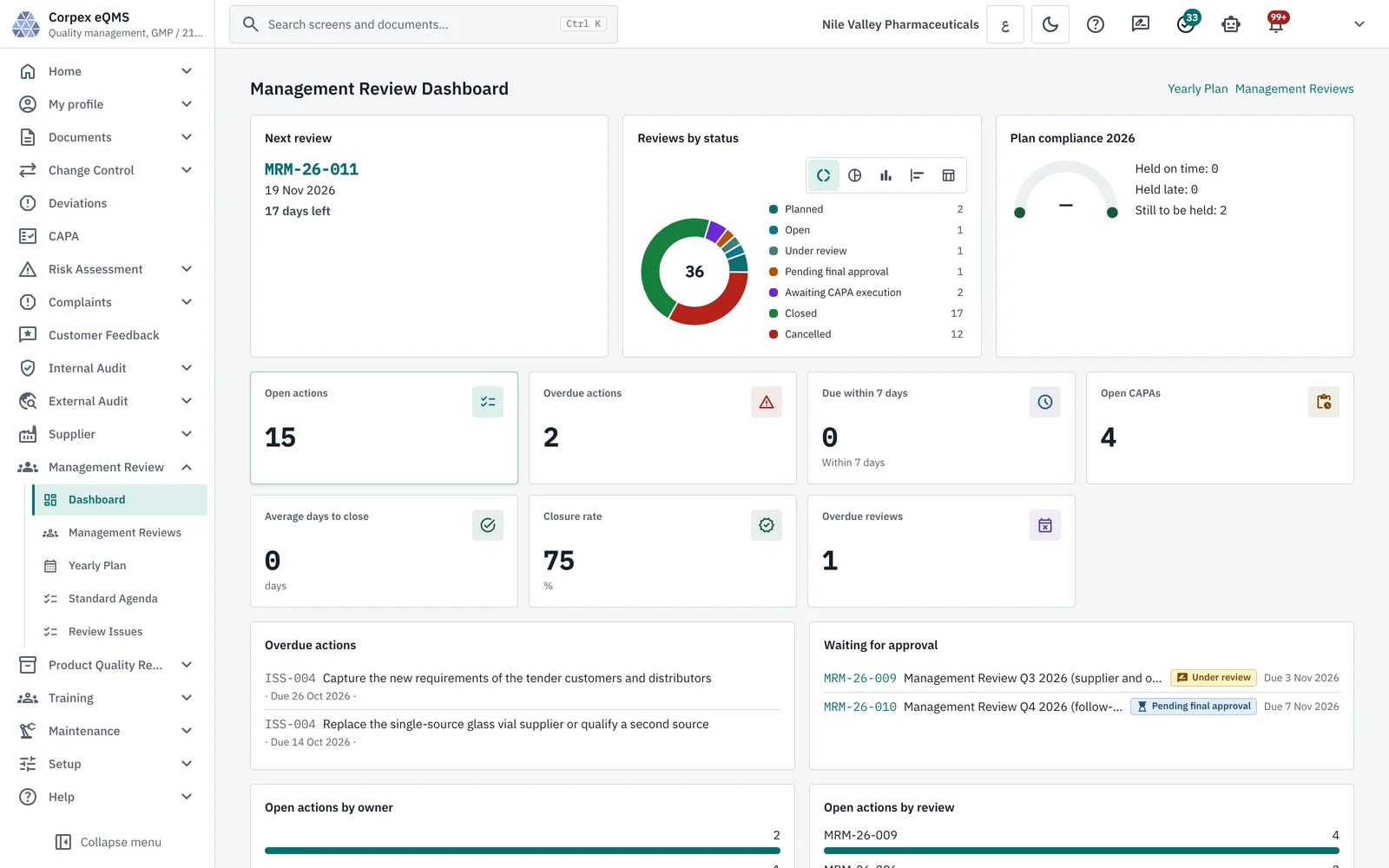
  • Yearly review plan and numbered review meetings
  • Standard agenda of review inputs and outputs
  • KPIs computed from deviations, CAPA, change and risk, frozen with the review
  • Review actions with owners, due dates and escalation to CAPA
Explore Management Review
Explore Performance Management
Corpex-eQMS management review dashboard with next review, reviews by status, open and overdue actions and closure rate
12 / 12

Product Quality Review

One e-signed review per product group and period, built from the records already in the system.
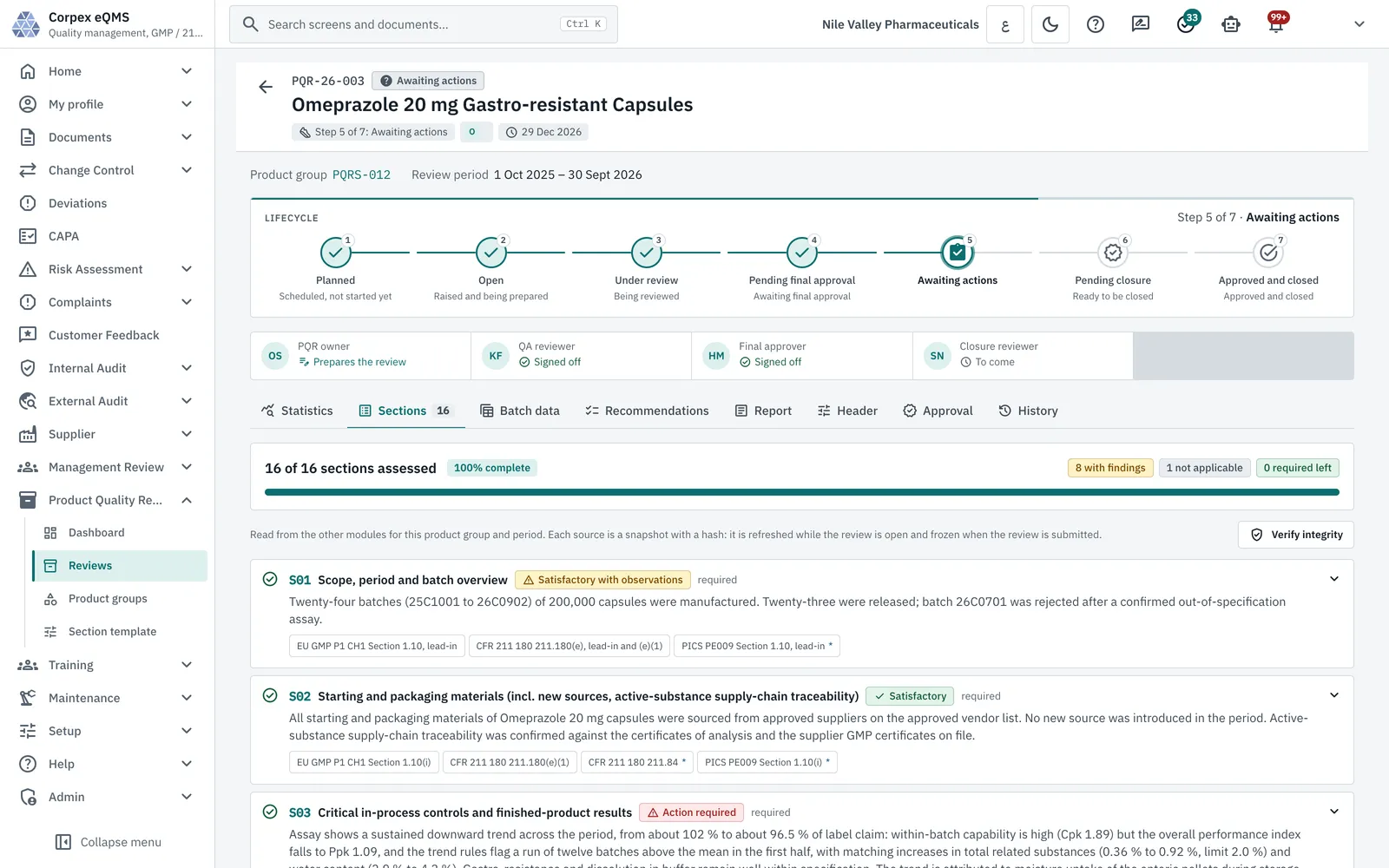
  • 16 sections, each referenced to EU GMP Ch.1, 21 CFR 211.180(e) and PIC/S
  • Batch data imported from Excel, then frozen with a SHA-256 hash
  • Cpk / Ppk, control charts and trend rules on each parameter
  • Recommendations that start a CAPA or a change request
Explore Product Quality Review
Corpex-eQMS product quality review at step 5 of 7 with 16 of 16 sections assessed and their regulatory references
One Workflow Engine

Every record shows where it is, and who signs next

Deviations, CAPA, changes, risks, audits, supplier approvals, maintenance plans, management reviews and PQRs all run on the same configured workflow engine. The record shows its lifecycle, the current step and the people on it, and each step that decides something asks for an electronic signature.

  • Steps, owners and signature rules configured per workflow, not written per module.
  • Tasks land in the owner's inbox, with due dates and overdue flags.
  • Two workflows for deviations: standard, or with first and second review.
Corpex-eQMS deviation record with its eight-stage lifecycle and record tabs for assessment, investigation, CAPA and effectiveness
CAPA Effectiveness

A CAPA closes on evidence, not on a signature alone

ICH Q10 expects corrective and preventive actions to be checked for effectiveness. In Corpex-eQMS each CAPA keeps its source record, its evidence and an effectiveness check with a result of effective or not effective, then goes through e-signed final approval.
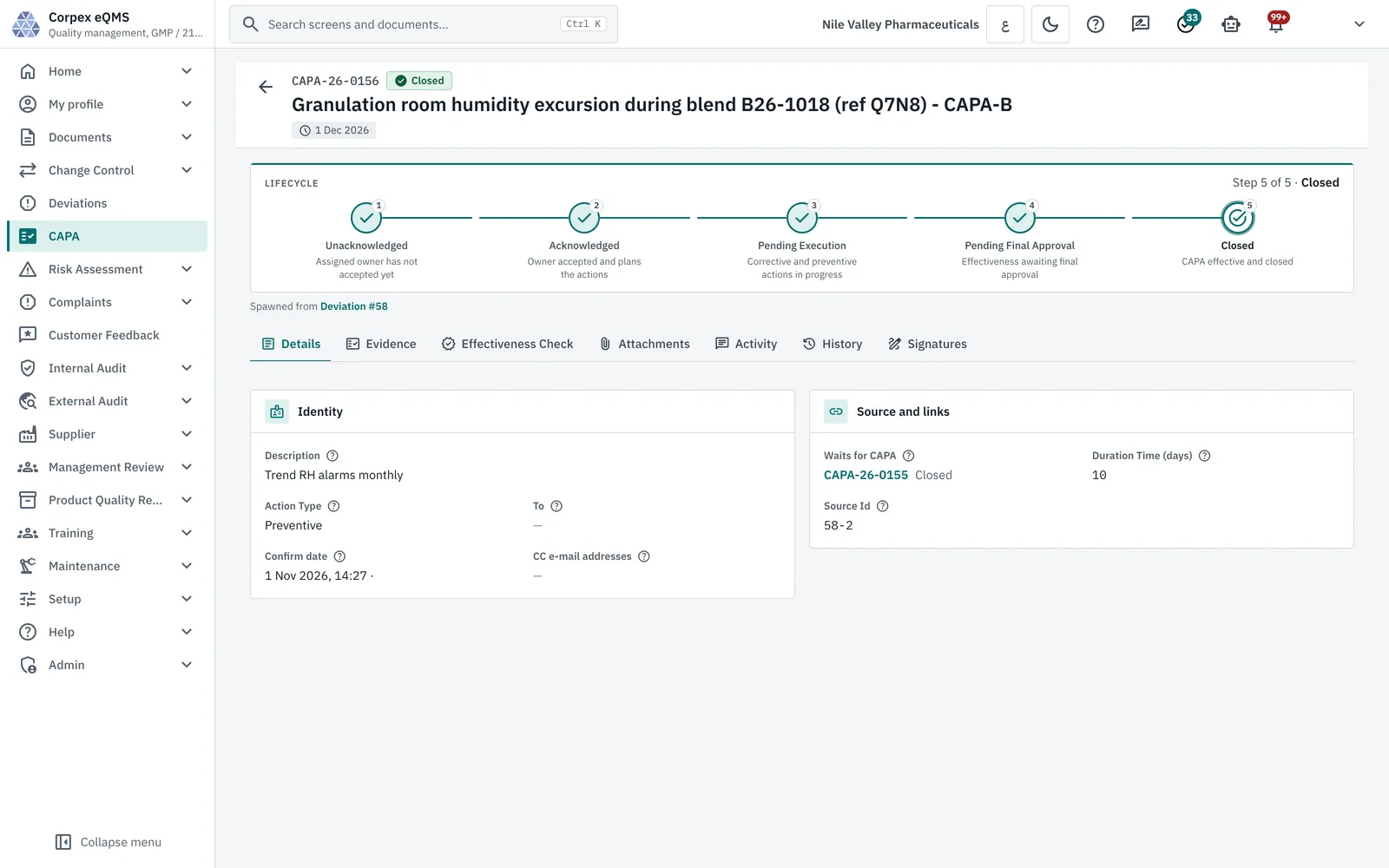
  • Spawned from the deviation, complaint, audit or review that found the problem.
  • Evidence, effectiveness check and signatures on their own tabs.
  • The raiser and the assignee own the record while actions are open.
Corpex-eQMS CAPA record spawned from a deviation, closed after its five-step lifecycle, with evidence and effectiveness check tabs
Product Quality Review

The annual product review, assembled from live records

The PQR pulls the deviations, complaints, CAPAs and changes for the product and period, adds batch results imported from Excel, and computes capability and trends. The report prints with the signatures of everyone who reviewed and approved it.

  • Annual coverage per product group on the PQR dashboard.
  • Batch data frozen at submission, with its hash shown on screen.
  • A seven-step signed lifecycle, from planned to approved and closed.
See the Product Quality Review page and film
Corpex-eQMS product quality review sections with outcome, evaluation and EU GMP, 21 CFR and PIC/S references
Inspection Ready

What an Inspector Checks in an eQMS


Is the SOP on the floor the approved one?

One controlled register with the effective version, controlled copies issued and withdrawn by signature, and staff retrained when a version changes.

Did the CAPA actually work?

Each CAPA links back to the event that raised it and carries an effectiveness check before final approval.

Who did what, and when?

Every change is written to an append-only, hash-chained audit trail with the user, the time, the old and new value and the reason.

Were the signatures real?

Signatures re-authenticate with the password, carry a meaning and a reason, and are refused for the person who produced the record.

Global Compliance

Built Around the Rules Quality Systems Are Inspected Against


The technical controls in Corpex-eQMS map to the regulations below. Each card names the control that answers it.

US FDA

21 CFR Part 11

Electronic records & signatures

Signing re-enters the password, records a meaning and reason, prints name, date and meaning, and is hashed with the record it approves.

EU

EU GMP Annex 11

Computerised systems

Role-based access per module, password rules, lockout after failed sign-ins, idle sign-out and an audit trail on every GMP write.

EU / ICH

EU GMP Ch.1 · ICH Q10

Pharmaceutical quality system

CAPA with effectiveness checks, change control, management review with computed KPIs, and product quality reviews.

ICH

ICH Q9(R1)

Quality risk management

Severity, occurrence and detection ranks, initial and residual risk, residual risk acceptance and a risk heat map.

US FDA

21 CFR 211.180(e)

Annual product review

The PQR's 16 sections carry their 21 CFR, EU GMP Ch.1 and PIC/S references, with an annual default review period.

ISO

ISO 9001:2015

Clauses 9.2 and 9.3

Internal audit programmes and plans, and management review meetings with the standard inputs and outputs agenda.

ISO

ISO 19011

Auditing management systems

An audit programme with plans, executions, checklists, observations and a list of qualified auditors.

PIC/S

ALCOA+

Data integrity

Entries attributed to the signed-in user, terminal statuses locked in the database, and corrections made by new version, never in place.

Audit trail

Tamper evidence

Chained and sealed

Each audit row stores a SHA-256 of the previous row; seals of the chain are HMAC-signed and kept outside the database.

GAMP

GAMP 5

Risk-based validation

Validated by the Corpex team with URS, functional specification, IQ, OQ and PQ and a traceability matrix; see CSV services.

Designed to the expectations of

  • US FDAUnited States
  • EMAEuropean Union
  • MHRAUnited Kingdom
  • PIC/SInspection co-operation scheme
  • ICHHarmonised guidelines
  • ISOManagement system standards

Compliance belongs to the validated system and the procedures around it. Corpex-eQMS supplies the technical controls, and the Corpex validation team documents them for your inspection.

eQMS Software

An eQMS for Regulated Manufacturers, Wherever You Operate


Corpex-eQMS is built for pharmaceutical, biotechnology, food and chemical manufacturers who run quality on paper, shared drives and spreadsheets and need it under one controlled system. It works alongside CORPEX LIMS and CORPEX-ERP, and is validated like any other GxP computerized system through computer system validation (CSV).

Your servers or private cloud

Installed on-premise or in your own cloud tenancy, so quality records stay under your control.

License the modules you need

Start with document control and CAPA and add modules as the quality system grows; unlicensed modules stay switched off.

Implemented with you

Configuration, data migration, training and validation delivered by the Corpex team, then supported after go-live.

See a Deviation Go From Report to Closed CAPA

Book a demo and we will walk one deviation through assessment, investigation, CAPA, change control, retraining and the effectiveness check with you.

Request a Demo

eQMS Software FAQ

What is eQMS software?

eQMS software (electronic Quality Management System software) digitizes and automates the processes that make up a pharmaceutical quality management system: document control, CAPA, deviations, change control, audits, training, risk management, supplier qualification, complaints and management review. It replaces paper and shared spreadsheets with a controlled workflow and an audit trail.

What modules does CORPEX-eQMS include?

CORPEX-eQMS includes 15 licensable modules on one workflow engine: Document Control, Deviations, CAPA, Root Cause Analysis, Change Control, Risk Management, Complaints, Customer Feedback, Internal Audit, External Audit, Supplier Management, Training, Maintenance and Calibration, Management Review, and Product Quality Review.

Is CORPEX-eQMS suitable for pharmaceutical companies?

Yes. CORPEX-eQMS is built for GMP-regulated industries including pharmaceutical, biotechnology and medical devices, and is designed around FDA 21 CFR Part 11, EU GMP Annex 11, ICH Q9, ICH Q10 and ISO 9001 requirements.

How does eQMS software improve compliance?

An eQMS automates approval workflows, keeps a complete audit trail, enforces the current version of every controlled SOP, tracks CAPA effectiveness rather than just closure, and gives QA visibility into quality metrics in real time — reducing the manual re-keying and version confusion that produce most audit findings.

Can CORPEX-eQMS integrate with LIMS and ERP?

Yes. CORPEX-eQMS integrates with CORPEX LIMS and CORPEX-ERP, so laboratory results, deviations and business data can flow into the same quality workflow instead of living in separate systems.

Where is CORPEX-eQMS installed?

CORPEX-eQMS is installed on your own servers or in your own private cloud, so quality records stay under your control. Each site licenses the modules it needs, and the Corpex team configures, validates and supports the installation.

Download CORPEX-eQMS Brochure

File: Corpex-eQMS 2023 (PDF)

Download
Quality Guides

Running a Quality System That Passes Inspection

Practical guides on CAPA, deviations, validation and digital quality. See all articles.

Quality

The CAPA Process in Pharmaceutical GMP

Triggers, root cause analysis, effectiveness checks and the failures inspectors flag most.

Quality

Deviation vs OOS Investigation: The Difference

FDA OOS Phase I and II lab investigations versus a GMP deviation, and how to route each.

Validation

eQMS Validation Under GAMP 5

Software category, risk-based testing, Part 11 and Annex 11 controls, and what the validation package holds.

Quality

Root Cause Analysis in Quality Management Systems

Fishbone diagrams, 5 Whys and fault tree analysis for pharma and manufacturing quality.

Quality

Digital QMS Software: Moving Quality Off Paper

How a digital QMS replaces paper workflows, from document control to CAPA.

Regulatory

Regulatory Information Management (RIM)

What a RIM system tracks, why spreadsheets stop working at scale, and how RIM links to change control.